Each month I have updated my profile picture and sent out a blog article inviting all members to do the same. It really is fast and easy to do! As I have received questions about how to further add to your profile and improve your “discoverability” on ToXchange, I will be posting a new series of articles entitled “Just Ask Ashley” on how to do other things as well. Today, I’ll detail how you can post your curriculum vitae (CV) to the Members CVs site on ToXchange. Of course, you will first want to update your CV prior to posting. Once you’re ready with your updated CV (.doc or .pdf files accepted), here’s how to upload it on ToXchange:
How to Upload your CV:
- Log in to ToXchange.
- Select “Member CVs” in the orange navigation bar at the top of your screen.
- You are now on the Member CVs webpage where you can filter, sort, search, and download all posted member CVs—and upload yours!
- To post your CV, select “Add a File” in the About this Topic box on the right side of your screen.
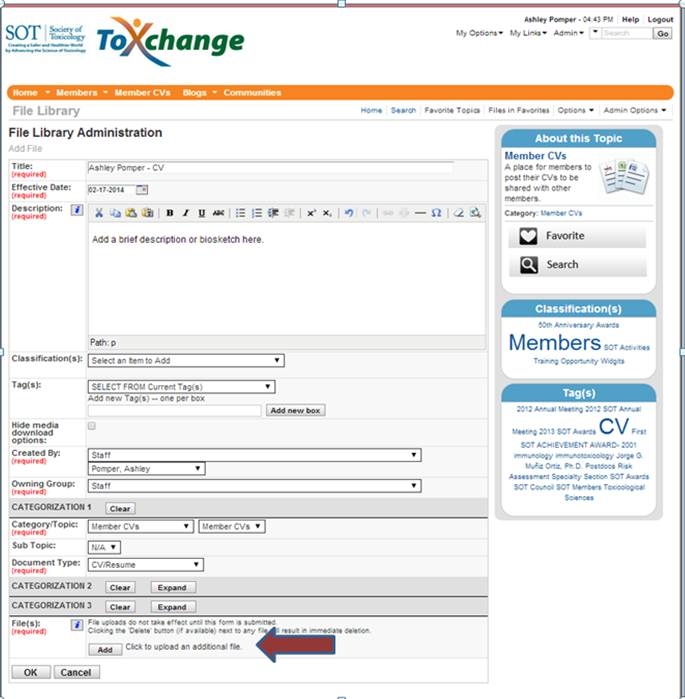
- You are now on the File Library Administration page (see screen shot). Input your CV title at the top (note: be sure to include your full name in your CV title), add a brief description or biosketch in the description box, and upload your CV by selecting the “Add” button near the bottom of the page. Be sure to fill in all the required items and click “OK” to complete the upload.
- Once you have uploaded your CV, be sure to keep it current by updating it regularly.
That’s it!
If you have any questions on how you can update your profile on ToXchange, please submit them by selecting the “Add Comment” button at the bottom of this blog article. Uploading your profile picture and your CV are just two of the first things you can do.
I’ll cover more items every month. So remember, if you need to know how to do something on ToXchange, just add a comment or send an email to “Just Ask Ashley” at SOT Headquarters.
Wishing you all the best,
“Just Ask” Ashley